
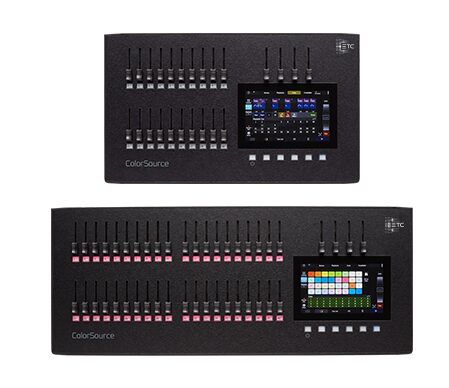
The ETC ColorSource console is ETC’s affordable way in — the brand’s quality and support at a price schools and small theatres can actually reach, without the depth (or the cost) of the Eos family. It is a deliberately simpler tool, and understanding that is the key to being happy with it. Here is an honest owner-level look at where it shines and where it stops, drawn from community opinion rather than a hands-on test.
Where these takes come from
A synthesis of recurring owner opinions across English-speaking communities (r/lightingdesign, ControlBooth). See also our ETC Eos review and theatre lighting console guide. The framing stays honest throughout: this is what owners report, not a first-hand bench review.
What owners love
1. Simple and friendly
ColorSource is built to be approachable, and owners consistently say so. Fader-per-fixture style control, straightforward color picking and basic cues are the sort of thing newcomers and volunteers grasp quickly. For schools, community theatres and houses of worship — where the operator is often untrained and turnover is high — that gentle learning curve is the single biggest selling point.
2. ETC build and support
It carries ETC’s reputation for solid hardware and excellent support and documentation. Owners describe that as a real reassurance for institutions: when something goes wrong, there is a serious company and a well-documented product behind the desk, which is not something every budget console can claim.
3. Handles color and simple moving lights
Within its class, ColorSource manages LED color and basic moving-light control well. Owners running modest rigs of LED washes and a few movers report it does what they need without fuss, which is exactly the brief for the venues it targets.
4. A path toward Eos
For organizations already in the ETC world, ColorSource fits the ecosystem neatly and eases a later step up to Eos. Owners see it as a sensible on-ramp: you stay within a family you trust, and the eventual move to a deeper desk is less of a leap.
What owners flag
1. Not an Eos — different platform
The single most important thing owners stress: ColorSource is not the command-line, cue-based Eos workflow. It is a separate, simpler console. Programmers who sit down expecting Eos depth will find it limited, and much of the disappointment reported online comes from that mismatched expectation rather than any fault in the desk.
2. Limited for complex shows
Big moving-light rigs, deep effects and large cue stacks are beyond its comfort zone — that is squarely Eos territory. Owners who push it toward ambitious productions hit its ceiling, and the community advice is to recognize where that ceiling sits before you buy.
3. You may outgrow it
As productions get more ambitious, theatres often move up to an Eos-family desk such as the Element or Ion. Owners frame this less as a flaw and more as a natural graduation — ColorSource does its job, and then a growing program moves on.
Who it’s for
ColorSource is ideal for schools, community theatres, houses of worship and small venues that want ETC reliability and simplicity at a low price. If you need cue-based theatre depth, go straight to the Eos family; if you are in live music, look at the ChamSys QuickQ or Obsidian Onyx.
My honest take
Reading across owner sentiment, ColorSource does exactly what it sets out to do: ETC quality, simply and affordably. The one piece of advice that matters most is to go in clear that it is not Eos — it is a friendlier, shallower console, and judged on that basis it is excellent. For small institutions it is a smart, dependable pick; for cue-heavy theatre, the honest synthesis is to save up for an Eos desk instead. See our best console under $1,000.
FAQ
Is the ETC ColorSource the same as Eos?
No — ColorSource is a separate, simpler console. It does not use the Eos command-line, cue-based workflow, and expecting it to is the most common source of frustration.
Is ColorSource good for a school or church?
Yes — it is a top pick for schools, community theatres and worship venues: ETC reliability and support, easy to learn, and affordable.
Can ColorSource run moving lights?
It handles LED color and basic moving lights well for its class, but big moving-light rigs are Eos territory rather than something to ask of this desk.
ColorSource or Eos?
ColorSource for simple, affordable control; Eos for cue-based theatre depth and complex shows. Match the desk to the ambition of your productions.
Photo credit: Photo: ETC (etcconnect.com)
Affiliate links: the price is the same for you, the commission funds our tests. As an Amazon Associate we earn from qualifying purchases.Where to buy : ETC ColorSource 40
Retailer Why Thomann Reference price, 3-year warranty, pro stock in Europe Check price at Thomann → Amazon Fast shipping, used and renewed units See on Amazon →
💡 Essential accessories for your lighting console
This page contains affiliate links. If you buy through them, we may earn a commission at no extra cost to you.
- Dust cover : ETC Dust Cover ColorSource 40
- DMX cable, 5-pin, 5 m : Stairville PDC5CC 5,0 m
- DMX terminator, 5-pin : Stairville DMX Terminator XLR 5-Pol
- DMX splitter, 2 outputs (3/5-pin) : Enttec D-Split (XLR 3 et 5 broches)
- USB gooseneck lamp : Adam Hall SLED 1 Ultra USB